

How to Turn Your Child's Drawing Into a Real Animal (Without AI Fixing It)
Somewhere in your house there's a drawing of an animal with too many legs. Maybe it's a dog with seven. Maybe it's a cat whose head is bigger than the rest of it put together. Your child knows exactly what it is, and they're slightly offended you had to ask.
Here's a lovely way to take that drawing seriously: turn it into a photograph of the real animal. Not a tidied-up version. The actual creature, seven legs and all, standing in daylight as if it wandered out of a nature documentary.
The artist Tom Curtis has been doing this by hand since 2016, rebuilding his sons' drawings in Photoshop for a project called Things I Have Drawn. Each one is painstaking work. With a phone and an AI image tool, you can get surprisingly close at the kitchen table in a few minutes. There's just one trap to avoid.
The short version: photograph the drawing flat in good light, list its "mistakes" with your child, then tell the AI to keep every one of them. Say how many legs, how big the head is, which ear is missing. Most tools quietly correct a child's drawing unless you tell them not to. Then watch the result arrive together, and ask about it instead of just saying "lovely."
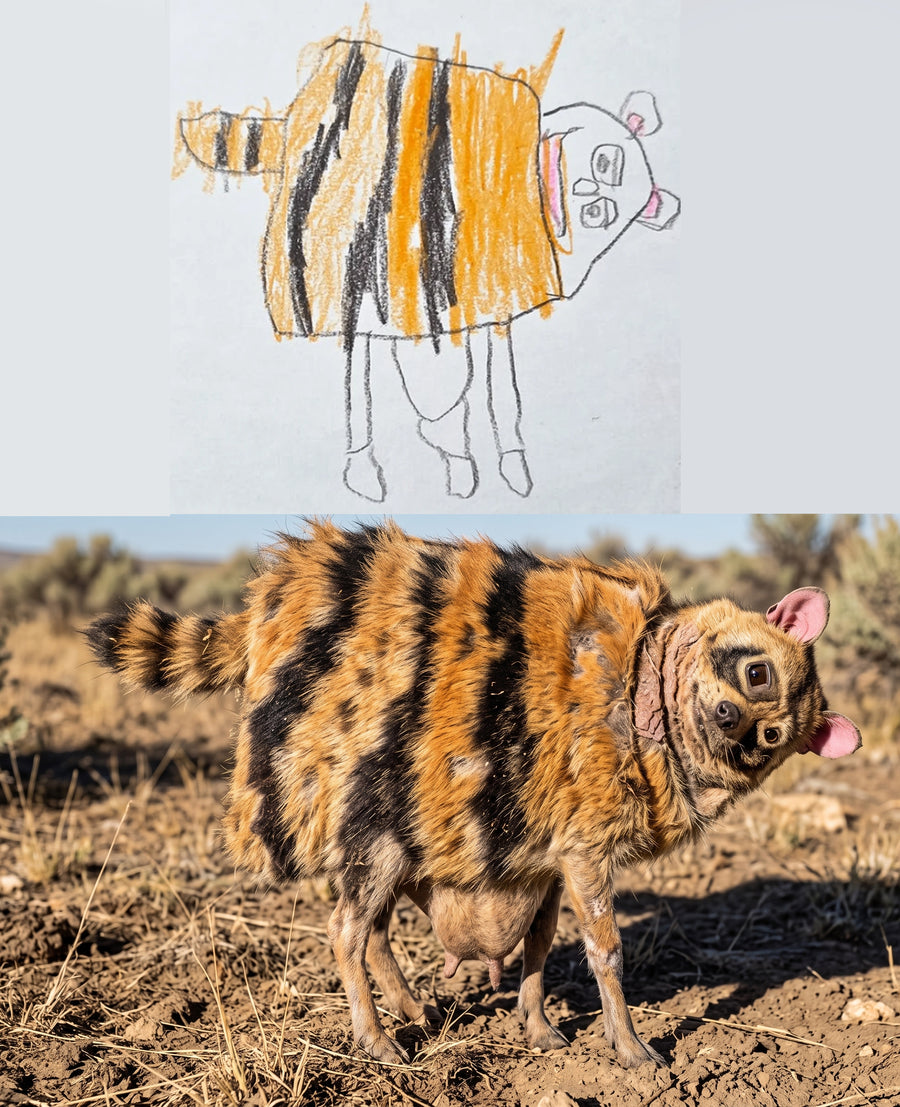
Why does AI keep "fixing" kids' drawings?
Image generators learned from photographs. They've seen millions of real cows and almost no imaginary ones. So when you show one a child's cow with six thin legs, it doesn't see a design decision. It sees a badly drawn cow, and it helpfully repairs it.
The legs thicken and go back to four. The ears come out as a matching pair. The head shrinks to a sensible size. You get a perfectly nice photo of an ordinary animal, and your child looks at it and says, "That's not mine."
They're right. The parts the AI corrected were exactly the parts they invented.
What do you need to get started?
- A drawing of an animal, or any creature. Whole bodies work best: something with a head, a body and legs, even if the legs are in odd places.
- A phone camera. Nothing fancier.
- An AI image tool that accepts a photo. ChatGPT, Gemini and plenty of image apps can do this now.
- About five minutes, and your child sitting next to you. That last one matters more than the tool.
How to turn your child's drawing into a real animal, step by step
1. Let your child pick the drawing
Don't choose the neatest one. Choose the one they care about. A creature with a name and a backstory beats a tidy one every time, because they'll have far more to say when it comes back. If they'd rather make something new, our list of drawing ideas for kids has a whole section of imaginary animals.
2. Photograph it flat, in daylight
Lay the paper on a table near a window. Hold the phone directly above it, not at an angle, and fill the frame with the drawing. Creases, smudges and crayon over the lines are all fine. Watch for your own shadow across the page, and take a second photo if faint pencil lines disappear.
3. Count the "mistakes" together
This is the fun part, and it's also what makes the result work. Go over the drawing with your child and list everything that isn't like a real animal. How many legs? Is one eye bigger? Where did the other ear go? Which way does the neck bend?
Write the list down. Your child is now the expert on their animal and you're the one taking notes. Most kids enjoy that switch a great deal.
4. Tell the AI exactly what to keep
Upload the photo, describe it as a real creature, then spell out every feature that has to survive. Something like this:
Turn this child's drawing into a realistic wildlife photograph of a real animal. Keep the anatomy exactly as drawn: it has seven legs, the left eye is twice the size of the right, and the neck bends backwards. Do not correct the proportions. Do not add or remove legs. Do not make it symmetrical. Real fur, natural daylight, standing on a rock.
Be blunt with numbers. "Seven legs" works far better than "lots of legs." Mention colours if they matter, too, since kids are usually very particular about those.
5. Check it against the drawing
Put the result next to the original and go back through your list. Did it keep all seven legs? Did it shrink the head? Something will often have been "fixed." Tell the tool what went wrong in plain words, such as "it has five legs, it needs seven, keep everything else the same," and try again. Expect a few rounds.
6. Reveal it together
If you can, don't peek first. Let your child see it at the same moment you do. The wait between sending the photo and seeing the creature is half the fun, and it's the bit they'll describe to their grandparents.
What should you say when the creature appears?
Ask a question instead of giving a verdict. "Lovely!" ends the conversation. "Why does it have seven legs?" starts one, and only your child knows the answer.
Early-years specialists at Michigan State University Extension suggest swapping "What is it?" for "Tell me about your picture," so a child explains the idea in their own words. Once the photo is on screen, these work well:
- What does it eat?
- Where does it sleep at night?
- Why is one eye bigger? What can it see with that one?
- What noise does it make?
- Is it friendly? Who are its friends?
You'll usually find the answers were ready and waiting. There's good research behind this kind of talk, too. In a study published in Child Development in 2013, Elizabeth Gunderson, Carol Dweck and colleagues found that the more parents praised their toddlers' effort and actions, the more those children believed at age seven or eight that abilities grow with effort. Talking about what your child decided, not only how good it looks, is a small everyday version of the same thing.
Other ways to bring a child's drawing to life
A realistic photo isn't the only option. Depending on your child, one of these might land even better.
- Animate it. Meta's free Animated Drawings demo makes a drawn character walk, wave or dance. It was designed around human-shaped figures, so a stick person will do better than a seven-legged beast.
- Make it cuddly. Companies such as Budsies sew a custom soft toy from a child's drawing. It's a handmade toy with a price to match, so it suits a birthday more than a rainy Tuesday.
- Borrow the idea. Tom Curtis's book Things I Have Drawn is full of his sons' creatures rebuilt as photographs. Kids love hunting for the "mistakes" that survived.
- Print the pair. Once you have a photo you both love, print it next to the original drawing. The two together look great framed. There are more ideas like this in our guide to what to do with kids' artwork.
The shortcut: Crayon to Creature
Full disclosure, this one is ours. We made Crayon to Creature because step 5 is where most people give up. The model keeps correcting the drawing, and every fix seems to undo something else.
It's a Claude skill plus short video lessons. You add the skill once, photograph the drawing and send it. About a minute later you get back a photograph of the animal your child designed, with the extra legs, odd ears and enormous heads left exactly where they were drawn. Most of the skill is a list of things the model must not "improve," and a repair guide gives you the exact words to type if something gets corrected anyway.
- Works from your phone, no computer needed
- About five minutes the first time, including setup, then roughly a minute per drawing
- An animation lesson that makes the finished creature move for a few seconds
- Print-ready files, big enough to frame
- Everything in English, Arabic, Hindi and French
Got a drawer full of creatures? Pick one and see it standing on a rock.
Frequently asked questions
Is it safe to upload my child's drawing to an AI tool?
Upload the drawing, not your child. Crop out faces, names, school logos and anything else that identifies them, and check the tool's privacy settings first. Many let you switch off the use of your uploads for training. A photo of a crayon animal on its own gives away very little.
What kind of drawings work best?
Whole animals with a clear outline work best: a head, a body and legs, in pen, marker or crayon. Very faint pencil can get lost, so retake the photo in brighter light. Busy scenes with lots of creatures are harder, so start with one animal per photo.
What age is this good for?
Any age that draws animals, from about three upwards. Younger children love the surprise. Older kids often get even more out of it, because once they know the photo keeps every detail, some start designing stranger creatures on purpose.
Can I print the result?
Yes. Save the largest version your tool offers and print it the same size as the original drawing, then frame the two side by side. Crayon to Creature's files are sized to print at A3 without the edges going soft.
How long does it take?
Photographing and writing the prompt takes a few minutes. Getting every detail right with a general AI tool can take several attempts. With Crayon to Creature, the first one takes about five minutes including setup, then roughly a minute per drawing.
One last thing: keep the original. The photo is the fun part, but the paper is the proof that someone small once decided a dog should have seven legs. And they were right.